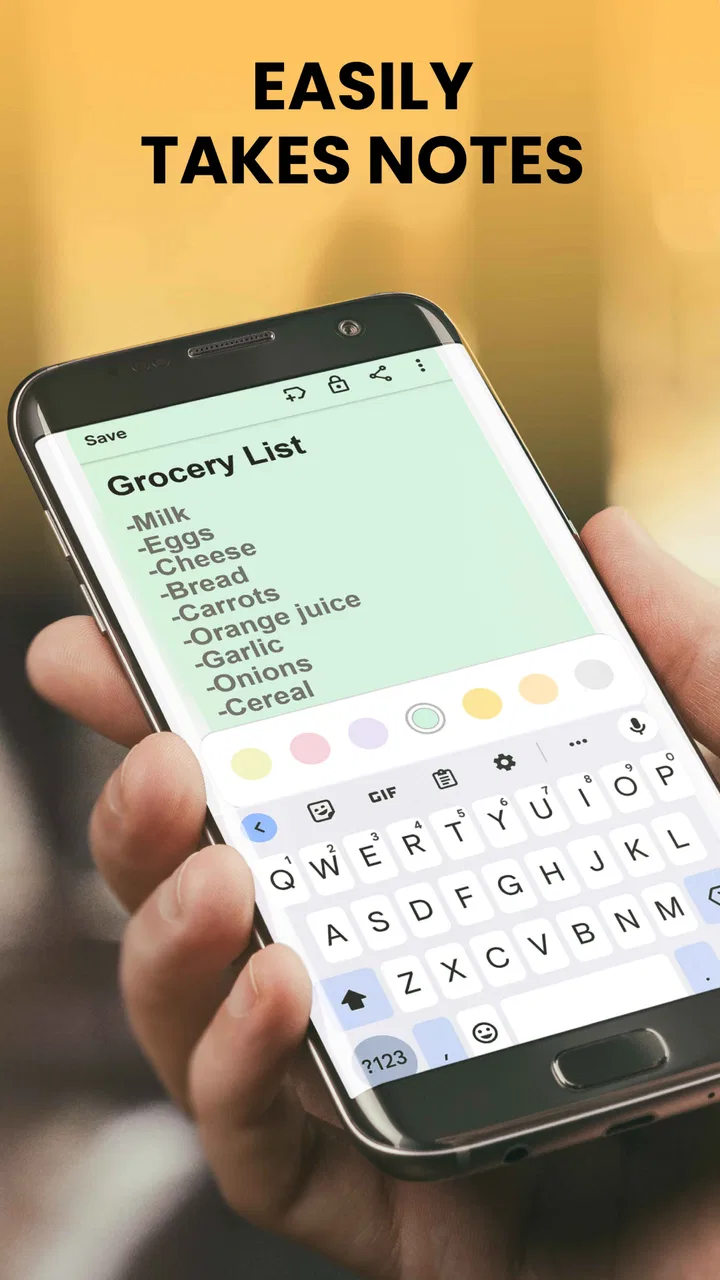
Notes, Notepad, To Do Launcher
- 4.2
- Rating
- 1.00M
- Installs
- Free
- Price

 Analysis by App-foxy
I like productivity apps that get out of the way, and Notes, Notepad, To-Do Launcher follows that idea closely. It is a free productivity app from AtomApplications that puts short notes, simple to-do lists, and reminders close to the point where I need them. Instead of asking me to build a large workspace, it focuses on capturing something quickly and returning me to whatever I was doing.
That simplicity is both its appeal and its boundary. I would recommend it to someone who wants a lightweight place for errands, quick ideas, short checklists, and reminders. I would not choose it as my main tool for a large project, shared planning, detailed document writing, or a complicated personal knowledge system. The best experience comes from treating it as a fast-access scratchpad with useful follow-up prompts, not as an all-purpose office suite.
What to expect when you open it
The app’s store summary describes its purpose well without saying everything about how it feels in daily use: it combines notes, to-do lists in a notepad, and reminders in a launcher-style experience. The practical difference is that the app is designed around reducing the distance between remembering something and writing it down. That makes it especially suitable for small pieces of information that would otherwise end up in a chat with yourself, on paper, or forgotten entirely.
You May Also Like

 Blood Strike: 2.5 Anniversary
Blood Strike’s Loadouts Turn Every Drop Into a Tactical Gamble
A close look at Blood Strike’s custom loadouts: how fast access to signature weapons reshapes its battle royale rhythm, rewards preparation, and narrows the gap between fights.

 Pandora - Music & Podcasts
Pandora’s Music Is Easy to Start, but Harder to Recover
Pandora’s strength is its low-effort path from a seed to a station. Its weak spot is how much confidence it asks you to place in connection, setup, and quiet recovery.

 8 Ball Pool
 Is Built on Rivalries, Rematches, and Routine
A close look at the rivalries, rematches, shared routines, and unanswered safety questions that turn a quick pool match into a persistent mobile community.

 Samsung Music
’s Quiet Strength Is Playing What You Already Own
Its reach comes less from spectacle than from dependable access to a personal library. That simplicity is both the app’s strongest retention engine and its ceiling.

 AccuWeather: Weather Radar
AccuWeather Review: A Quick, Clear Forecast for Everyday Decisions
For everyday plans, the best forecast is the one you can understand quickly. AccuWeather makes rain timing, radar, and local conditions easy to act on, with a few trade-offs.

 Hill Climb Racing
Why Hill Climb Racing Still Turns Crashes Into One More Run
A tiny car, a bumpy hill and one more upgrade: Hill Climb Racing keeps resurfacing because its simple chaos makes every near-miss feel personal.
More From Our News Desk



On Android, it requires version 10 or later, so compatibility is straightforward for people using a reasonably recent device. It is rated for Everyone, which matches the uncomplicated nature of the tool. AtomApplications has kept the concept accessible rather than turning it into a feature-heavy planning platform.
The app has reached over a million installs, with an average rating of 4.2 from around nineteen thousand ratings. Those figures suggest that the basic idea works for a substantial group of users, while the rating also hints that this is not a perfect replacement for every kind of notes app. I think that is a fair position: its value depends heavily on whether you prefer speed and simplicity over depth.
The first thing I would do is decide what role it should play. If I want one place for temporary reminders and small action lists, it makes sense. If I expect folders, rich formatting, collaboration, document attachments, or a deeply searchable archive, I would set a different expectation before installing it. Its strength is quick capture, not elaborate organization.
Who will get the most from it
This is a good fit for someone who regularly thinks, “I need to remember that later,” but does not want to open a full calendar or project-management app. A student could use it for a short list of things to bring to class. A parent could keep a grocery reminder visible while moving through a store. Someone working from home could write down three tasks for the afternoon without creating a formal project.
I also see value for people who find complex productivity systems discouraging. Many planning apps begin by asking users to choose workspaces, labels, projects, priorities, or views. That can be useful eventually, but it can also delay the one action that matters: recording the thought. Here, the smaller scope makes it easier to begin.
People who should skip it are those who need a shared task system, detailed recurring planning, extensive document editing, or a reliable archive of years of notes. In those cases, a full notes platform, calendar, or task manager will usually be a better choice. Choosing this app for those jobs would mean fighting its compact design instead of benefiting from it.
From installation to the first useful result
I’d use the first few minutes to give the app one clear job rather than trying to make it replace every place I keep information. A small, real task is the best test: it shows whether quick capture and a reminder fit naturally into your routine. Once that feels useful, the next section can help you decide what to keep here and what belongs in a fuller planning tool.
Start with one real task, not a complete life system
After installing the free app, I would avoid trying to transfer every existing note immediately. The fastest way to understand it is to create one item that has a clear purpose and a near-term outcome. For example, I might write “buy printer paper before Friday” or “ask Sam about the appointment.” A concrete entry makes it easier to judge whether the launcher-style approach fits the way I actually work.
Keep the first note short. A quick-capture tool becomes less useful when every entry turns into a paragraph. If the thought needs background, I would write the essential action first and add only the detail needed to recognize it later. “Send invoice to Lee” is more useful as a prompt than a vague note such as “invoice.” This small habit makes reminders easier to act on.
For a first setup, I would separate information by intention rather than by subject. A note is useful when I need to preserve a detail, while a to-do item is useful when I need to perform an action. That distinction sounds obvious, but it prevents a common problem: filling a checklist with reference information that never gets completed, or writing an important action as a passive note that never prompts me.
The first successful action is a completed loop
The best first test is not merely saving an entry. It is completing the entire loop: capture something, return to it at the right moment, and mark the task as handled. I would create a small errand list, set a reminder for a realistic time, and then use the app when that reminder becomes relevant. That shows whether the app’s quick-access design suits my routine better than a standard notes screen.
Here is a realistic example. Before leaving home, I might create a short list containing “pick up medicine,” “buy batteries,” and “send the form.” The first two belong to the same outing, while the last one is a separate action. I would keep them as distinct entries rather than hiding everything inside one long sentence. When I return, the completed items can be cleared from my mental load, while the unfinished one remains visible as a separate follow-up.
This workflow reveals an important trade-off. A short list is easier to scan than a detailed plan, but it also depends on me choosing sensible wording and timing. The app can help surface what I wrote; it cannot decide whether “sort paperwork” means five minutes or an entire afternoon. I get better results when I break broad tasks into actions that have a visible finish.
Use reminders as prompts, not as a storage system
Reminders are most useful when they are attached to an action I genuinely intend to do. I would avoid setting a reminder for every thought, because an overloaded stream of prompts quickly becomes background noise. A better pattern is to reserve reminders for items that have a time-sensitive consequence, such as making a call, taking something along on a trip, or checking a deadline.
One non-obvious advantage of a small app like this is that it can act as a temporary holding area between deciding and scheduling. If I am not ready to place something into a calendar, but I know I must revisit it, a reminder can bridge that gap. The limitation is that this should not replace a calendar when an appointment involves a fixed time, location, or other people. A note can tell me to prepare for a meeting; it is not the same as managing the meeting itself.
Keep the launcher concept working for you
The launcher-style design makes most sense when the app is used at the moment of interruption. A thought arrives while I am cooking, commuting, studying, or switching between work tasks. I want to capture it before it disappears, then continue. To make that workflow effective, I would write entries that are recognizable without rereading a full explanation.
A useful technique is to begin action items with a verb: “call,” “buy,” “send,” “check,” or “pack.” For reference notes, I would begin with the subject: “Wi-Fi details,” “gift idea,” or “measurements.” This creates a visual difference between things I need to do and information I only need to remember. It is a simple personal convention, but it makes a minimalist tool feel more structured without adding unnecessary categories.
Where first-time users may hesitate
The word “launcher” can create an expectation that this is a complete replacement for the phone’s home screen or a broad automation tool. I would approach it more narrowly: it is a quick route into notes, lists, and reminders. The benefit is focus. The cost is that users looking for a full dashboard may find the experience too limited.
Another possible confusion is assuming that every note should become a to-do list. I found it more helpful to ask one question before saving: “Do I need to act, or do I need to remember?” If the answer is act, I write a task with a clear verb. If the answer is remember, I keep it as a note. This prevents the app from becoming a messy collection of half-finished intentions.
There is also a temptation to create very broad entries such as “prepare for travel.” That sounds efficient but produces friction later because the next action is unclear. I would turn it into smaller prompts such as “check passport,” “pack charger,” and “confirm transport.” The app is better at presenting a handful of direct actions than at managing a hierarchy of planning steps.
Practical workflows beyond basic notes
For shopping, I would group items by the trip rather than by supermarket aisle unless I already know that aisle structure well. The point is to keep the list fast to update when I remember something. For study, I would use a note for a question I want to investigate and a separate task for the action of looking it up. That keeps curiosity from being confused with an assignment.
For work, I would use it as a capture layer during calls or busy periods. I might record “confirm delivery address” as a task and “client prefers afternoon contact” as a note. Later, I could process both entries into the more appropriate system if the matter becomes part of a larger project. This is one of the app’s strongest trade-offs: it can reduce the pressure to organize immediately, but I still need a later review habit for anything that grows in importance.
For household routines, the app can hold a small rotating list: replace a filter, return a package, check supplies, or prepare something for the next morning. I would keep recurring responsibilities concise and review them at a natural transition, such as before leaving home. That makes the tool useful without forcing every routine into a complicated schedule.
How it compares with familiar alternatives
Compared with a standard notes app, this one is more focused on immediate actions and reminders. A conventional notes app is usually better for long writing, reference material, drawings, attachments, or a large archive. I would choose this app when I want less surface area and faster access, especially for entries that should not become permanent documents.
Compared with a dedicated to-do manager, it is likely to feel lighter and easier to approach, but less suitable for projects with many levels, dependencies, or shared ownership. A full task manager earns its complexity when I need recurring schedules, detailed prioritization, progress views, or collaboration. Notes, Notepad, To-Do Launcher is more appealing when the task itself is small and the main challenge is remembering to begin.
Compared with a calendar, it is better for flexible actions than fixed appointments. I would write “call the clinic” here if the time is open, but I would put an actual appointment in the calendar. Using the right tool for each kind of commitment prevents the app from becoming a substitute for systems it was not designed to replace.
What the current release means for a new user
The current version is 2.15.1, and the app was released on January 5, 2024. For someone deciding whether to try it, the practical takeaway is that this is an established app rather than an idea presented only as a short-lived experiment. I would still judge it by my own workflow instead of by its age or popularity, because a simple tool can be excellent for one person and frustrating for another.
The free price removes the need to make a large commitment before testing the concept. I would spend a few days using it for real errands and short tasks rather than evaluating it from a blank screen. If I naturally capture items and return to them, it is earning its place. If I keep moving everything into another app, that is a clear sign that I need a more specialized system.
My recommendation after using it
I see Notes, Notepad, To-Do Launcher as a practical first step for someone who wants a calmer way to catch small responsibilities. It does not ask me to become a productivity enthusiast. It simply gives short notes, action lists, and reminders a dedicated place, which can be enough to prevent everyday details from slipping away.
My strongest recommendation is to begin with one meaningful success: capture a real task, give it a clear verb, attach a reminder only if timing matters, and complete it. Then keep the app’s role deliberately small. Use it as the fast front door for your thoughts, while letting calendars and full task systems handle commitments that need deeper structure.
For first-time users, that boundary makes the experience reassuring. I do not need to organize my entire life before seeing a benefit. I can start with the next errand, the next call, or the next thing I am likely to forget. If that is the kind of help I want, Notes, Notepad, To-Do Launcher is an easy free app to try. If I need collaboration, extensive formatting, or project-level control, I would move directly to a more specialized alternative instead.
FAQs for Notes, Notepad, To Do Launcher
01What features does Notes, Notepad, To-Do Launcher offer?
Notes, Notepad, To-Do Launcher provides a seamless experience for organizing your life. Key features include note-taking, task management, and a customizable home screen launcher. Users can attach images, set reminders, and sync across devices. The app also offers color-coding for easy categorization and a search function to quickly find notes.
02Is Notes, Notepad, To-Do Launcher free to use?
Yes, the app offers a free version with basic features. However, it also provides a premium version that unlocks additional functionalities such as ad-free experience, enhanced customization options, and priority support. Users can choose based on their needs and upgrade anytime through in-app purchases.
03How secure is my data in Notes, Notepad, To-Do Launcher?
Security is a priority with Notes, Notepad, To-Do Launcher. The app employs end-to-end encryption to protect your data. Additionally, users can enable password or biometric authentication for extra security. Regular updates ensure that the app complies with the latest security protocols to safeguard your information.
04Can I sync my notes and tasks across multiple devices?
Yes, Notes, Notepad, To-Do Launcher supports cross-device synchronization. By signing in with your account, you can access your notes and tasks on any device, whether Android or iOS. This feature ensures that your information is always up-to-date and accessible wherever you are.
05Does Notes, Notepad, To-Do Launcher integrate with other apps?
The app offers integration with various productivity tools like Google Calendar and Dropbox. This allows users to streamline their workflow by syncing tasks and notes with their calendar and backing up data to cloud storage, ensuring a comprehensive and connected digital workspace.
Pros
- User-friendly interface for easy navigation.
- Customizable themes enhance user experience.
- Integration with calendar for better planning.
- Syncs across multiple devices seamlessly.
- Efficient search feature for quick access.
Cons
- Limited offline access may hinder productivity.
- No advanced encryption for sensitive data.
- Ads can be intrusive in the free version.
- Lacks collaboration tools for team use.
- Occasional sync delays with cloud services.

Notes, Notepad, To Do Launcher
Gallery